The game of football cannot be separated from tactical instructions. Moreover, in the latest football games such as eFootball 2026, both for Mobile, Console and PC versions.
eFootball 2026 provides a tactical feature called Individual Instruction or in English it is Individual Instruction.
This feature allows you to: player eFootball can provide additional tactical instructions to the players on the team.
Using the right Individual Instructions will certainly make your playing tactics better and more optimal.
Maybe some player eFootball there are still those who don’t understand how to use individual instructions and what the instructions are and how they work.
So, if you don’t understand all that then it would be right for you to read this article.
Why?
Because here I will discuss a tutorial regarding the explanation of Individual Instructions in eFootball as well as an explanation of how all these instructions work if we give them to players.
See the complete discussion below.
What is Individual Instruction in eFootball 2026?
Individual Instruction are tactical instructions given to a particular player in the team to specifically regulate the player’s way of playing on the field.
So, this instruction is a tactical instruction in nature individual so this instruction will only be given to one player.
For example, our team will use attacking playing style tactics so that it allows all players in the team to actively make forward attacking movements.
However, you want one of the players to stay stay behind so as not to make an attacking movement forward.
Therefore, you can give individual instructions to the player so that he will not move forward to attack but will remain stay behind.
How to Use Individual Instructions in eFootball 2026?
To use Individual Instructions in eFootball 2026, you can use the method by following the steps below:
- In the game start menu, select a section My team
- Select a section Tactics in the top left corner
- Select a section Individual Instructions
- Set Individual Instructions starting from the section Attack (Attack) And Defense
Please note that before you use this individual instruction, first make sure you understand the types of instructions available, starting from the meaning and function of each.
To understand more clearly the types of Individual Instructions available in eFootball 2026, please read the full explanation below:
Types of Individual Instruction in eFootball 2026
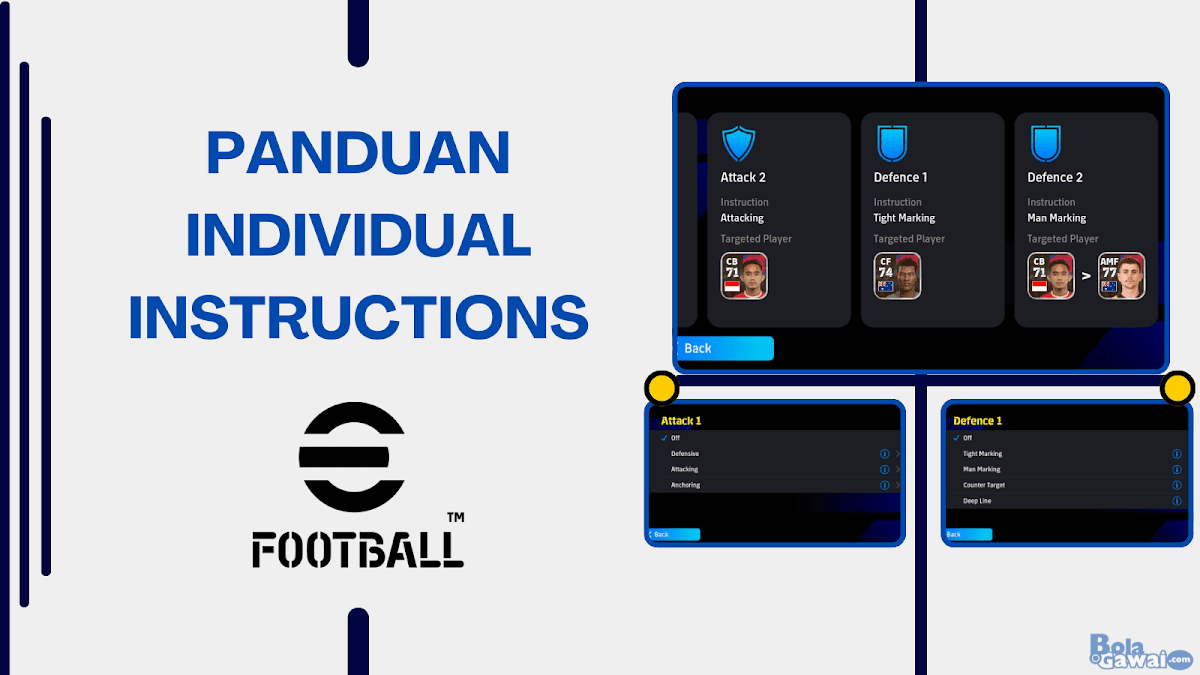
When you enter the Individual Instruction Menu section, here you will be provided with 4 tactical columns that can be adjusted, namely:
- Attack 1 (Attack 1)
- Attack 2 (Attack 2)
- Defense 1 (Defense 1)
- Defense 2 (Defense 2)
From each tactic Attack And Defense This has more derivative instructions that you can choose and set.
In the instructions section Attack (Attack) there are 3 instructions that can be selected, namely:
- Endure (Defensive)
- Attack (Attack)
- Anchor (Withhold)
And in the instructions section Defense (Defence) there are 4 instructions that can be selected, namely:
- Strict Control (Strict Marking)
- Control (Man Marks)
- Counter Targett (Counterattack Target)
- Inside Line (Inside Line)

So it can be concluded from each section of instructions, both Attack and Defense, that there are 7 Individual Instruction options that you can choose and arrange according to your team’s tactical needs.
Explanation of Attacks in eFootball 2026 Individual Instructions
In the Attack section, there are 3 tactical instructions that you can choose, namely Defensive, Attacking, and Anchoring.
For a complete explanation of these three instructions, you can read below:
Defensive (Defensive)
Defensive/Defensive Instructions will prevent your players from moving forward when the team is attacking. So that pPlayers will focus more on defense than attack.
This allows the back line to remain stable, but the player’s approach to attack will be slightly disrupted as a result of this instruction
So this Defensive/Defensive instruction allows players to only focus on defending.
Even when a player has the opportunity to run forward when attacking, the player will choose to retreat backwards to help the team’s defense.
By using this instruction for one of your players, you can get an extra player in the back line when the team is attacking.
Attacking
Attacking Instructions will make your players move more aggressively than usual. He will position himself more forward and will run more often too.
This will improve Attacking Work Rate from the player significantly because he will only focus on attacking. But, Defensive Work Rate from this player will decrease drastically.
This instruction cannot be used on players who play as FW (Forward) or attacker.
Anchor (Anchoring)
Anchor Instructions This will keep your players in their playing position from the start.
The player you choose with this Anchoring instruction will not leave his playing position horizontally.
For example, the center forward will remain in the center position and the winger will remain in the wing position.
Explanation of Defense in eFootball 2026 Individual Instruction
In the Defense section, there are 4 tactical instructions that you can choose, namely Tight Marking, Man Marking, Counter Target, and Deep Line.
For a complete explanation of these three instructions, you can read below:
Strict Control (Strict Marking)
Tight Escort/Tight Marking Instructions are tactical instructions that will make your players carry out marking to opposing players is stricter than usual.
To use this instruction, you need to play a match first in eFootball 2026. Because this instruction can only be used when you are setting game plan before the match starts.
You can set these instructions by selecting one of the players you want to target Strict Marking.
Later, the opposing player chosen as the target will be closely guarded by your players when the match starts.
In the next match that will do it marking to opposing players are your players whose positions are close to the opposing player.
So, not only one person is instructed to guard the opposing player, but all your players can take turns guarding the opposing player’s movements depending on how close your player is to the opposing player’s position.
The downside to this instruction is when your players do it marking to opposing players, empty gaps will be created in your team’s playing space.
This could be exploited by opposing players to attack through this gap so you also need to be careful when using this instruction.
Escort (Man Marking)
Indirectly an explanation for Escort/Man Marking Instructions it’s almost the same as Strict Marking i.e. the instructed player will do marking which is stricter towards its opponent’s target and these instructions can only be set before the match starts.
But there is a fundamental difference if you choose this instruction, namely opposing players will only be guarded by one player.
%20dan%20Tight%20Marking%20(Pengawalan%20Ketat)%20di%20eFootball%20Mobile-min%20(1).jpg "Explanation of Individual Man Marking and Tight Marking Instructions in eFootball 2026")
So, you need to choose which of the players on your team will control the existing opposing players target marking.
When the match starts, the player you have previously selected will play marking to opposing players, they will always guard the opposing players very tightly.
And it is worth reminding once again that the instructions Men Mark It also has a weakness, namely that opposing players can take advantage of empty gaps as a result of creating space left by your players while playing marking to one of the opposing player’s targets.
Counter Attack Target (Counter Target)
Counter Attack Target Instructions/Counter Target This will allow your players not to leave their starting position either to defend or when committing urge forward.
The player selected as the Counterattack Target will remain stay is near the opponent’s penalty box.
With your player not running backwards or forwards, your player’s stamina will not be drained even if the player has stamina ability which is very low.
Of course this will make it easier for the player to play full for 90 minutes.
Inner Line (Deep Line)
Inline Instructions/Inside Line This allows the selected players to move backwards to help the defense line when the team is defending.
This instruction cannot be assigned to players who play as DF (Defender). So you can only give this instruction to players who play as MF (Midfielder) or FW (Forward).
And when you use a 5 defender formation, these Inner Line instructions cannot be given to players who play as MF (Midfielder).
If you choose this instruction for a FW or Attacker player then the attacker will play the same role Lie Far Forward.
If you play with a high defensive line (High Defense Line) and wants the defense line to remain solid and strong even though it is implemented High Defense Line then the Inner Line instructions will be very suitable to use.
Cover
We have finished discussing the article regarding Tutorial Explanation of Individual Instructions in eFootball 2026 this time.
I hope that with this article, you can understand more about Individual Instructions in eFootball 2026 well.
Also read other interesting articles from us:
If you have further questions, you can use the comments column feature which is available at the bottom of this article.
Thank you for reading this article
News
Berita Teknologi
Berita Olahraga
Sports news
sports
Motivation
football prediction
technology
Berita Technologi
Berita Terkini
Tempat Wisata
News Flash
Football
Gaming
Game News
Gamers
Jasa Artikel
Jasa Backlink
Agen234
Agen234
Agen234
Resep
Download Film
Gaming center adalah sebuah tempat atau fasilitas yang menyediakan berbagai perangkat dan layanan untuk bermain video game, baik di PC, konsol, maupun mesin arcade. Gaming center ini bisa dikunjungi oleh siapa saja yang ingin bermain game secara individu atau bersama teman-teman. Beberapa gaming center juga sering digunakan sebagai lokasi turnamen game atau esports.